
The most important rules
- Stop using the card or stick and don't copy anything onto it.
- Don't format it, even if Windows says “You need to format the disk before you can use it.” Click Cancel.
- Don't run a repair before your data is safe. A check with
chkdsk /fcan change file remnants. - Always save recovered files to the PC or another drive.
Why the odds are good on memory cards
Memory cards and USB sticks usually use FAT32 or exFAT. Deleting only marks the directory entry as deleted; the data itself stays. Unlike internal SSDs, most cards and sticks have no TRIM wiping deleted areas right away.
A quick format only rebuilds the table of contents, so a deep scan can find the files by their content. A full format in Windows overwrites everything with zeros; after that, software can't recover anything.
How to recover data from an SD card or USB stick
- Connect the card with a card reader, or plug in the stick.
- Open DiskDetox and choose Recover files. Memory cards and USB sticks appear next to the PC drives.
- Run the Quick scan first. It finds recently deleted files with their names and folders, such as
DCIM\100CANON\IMG_0042.JPG. - If files are missing or the card was formatted, run the Deep scan. It searches all free space for photos (JPG, PNG, HEIC), videos (MP4, MOV), PDFs, Office documents and archives.
- Filter by type, check the preview and save to your PC.
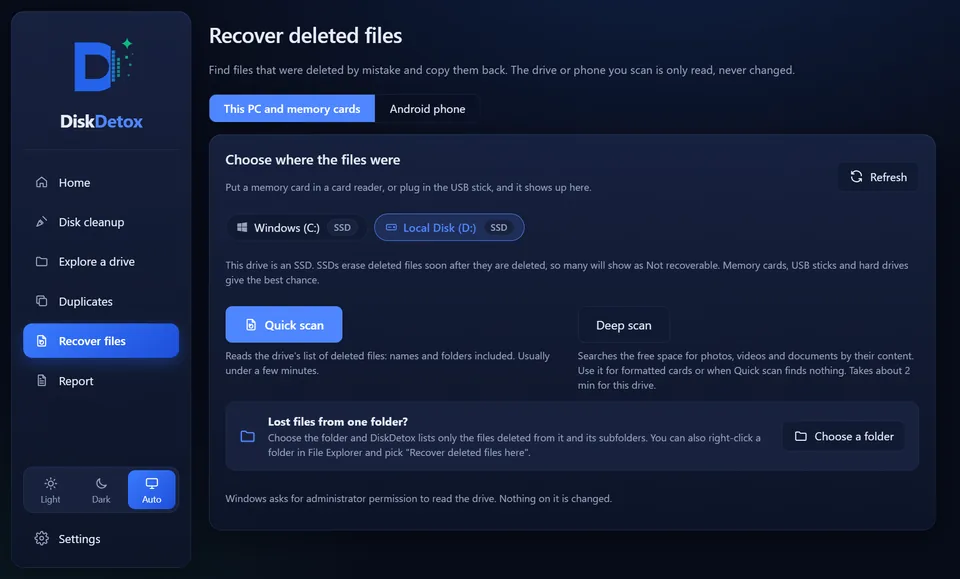
Scans are saved for 30 days, so you can go through the card again later without starting over. Photos from camera cards and phones are also covered in recover deleted photos, and recover deleted files explains quick and deep scans in detail.
Recover your memory cardQuick and deep scan for SD cards, microSD and USB sticks. DiskDetox only reads the card.
Files deleted on the PC from an emptied Recycle Bin are covered in recover files from an emptied Recycle Bin.
If the card isn't detected
Software can only read cards that Windows sees as a drive. Check:
- a different card reader or USB port,
- whether the card shows up in Disk Management (right-click Start → Disk Management), maybe without a drive letter or as “RAW”,
- the adapter for microSD cards, which is often the culprit.
If the card shows as RAW, don't format it; search for files with the deep scan. If it's physically damaged (broken, water damage, not detected anywhere), only a professional data recovery lab can help.
Repair the SD card, but only after recovery
Once your important files are safe, you can repair or reformat the card:
- To check for errors, right-click the drive → Properties → Tools → Check.
- To reformat, right-click → Format; exFAT suits cards over 32 GB.
- If errors come back afterwards, the card is at the end of its life. Replace it.
Frequently asked questions
Can I recover a formatted SD card?
After a quick format, usually yes, with the deep scan. After a full format in Windows, no, because all data is overwritten with zeros.
What about RAW photos (CR2, NEF, ARW)?
The quick scan finds them by name as long as their entries still exist. The deep scan looks for common formats like JPG, PNG, HEIC, MP4 and MOV; camera RAW formats aren't included at the moment.