
Open Disk Cleanup
There are several ways:
- Press Windows + R, type
cleanmgrand press Enter. - Search the Start menu for Disk Cleanup.
- In File Explorer: right-click drive C → Properties → Disk Cleanup. Depending on your Windows version, that button may open Storage settings instead; then use one of the ways above.
Choose the drive, usually C:, and wait while Windows works out how much it can free.
Clean up system files
The first view only shows your own account's files. The bigger win comes from Clean up system files. It restarts the tool with administrator rights and also lists update leftovers and, if present, the previous Windows installation.
What the options mean
| Option | What gets deleted | Safe? |
|---|---|---|
| Downloaded Program Files | ActiveX and Java leftovers from the browser | yes |
| Temporary Internet Files | old Internet Explorer / IE mode cache | yes |
| Delivery Optimization Files | update parts Windows shares with other PCs | yes |
| Recycle Bin | the Recycle Bin's contents | yes, if nothing important is in it |
| Temporary files | files older than 7 days in the Temp folders | yes |
| Thumbnails | File Explorer previews | yes, they're recreated |
| Windows Update Cleanup | superseded old update versions, see WinSxS cleanup | yes, but old updates can no longer be uninstalled |
| Previous Windows installation(s) | the Windows.old folder | yes, but you can no longer go back to the old version |
| Windows upgrade log files | upgrade logs | yes, if the upgrade went fine |
| Downloads (if shown) | your entire Downloads folder | careful |
Disk Cleanup or Storage Sense?
On Windows 11, Microsoft points people to Storage Sense in Settings (System → Storage). It has the same categories under Temporary files (Microsoft's guide), can run automatically and can set OneDrive files to online-only. The classic tool still works, though, and opens straight from the Run box.
Both share one limit: they only know Windows' own areas. Caches of Teams, Spotify, Discord, Chrome profiles or developer tools stay behind.
Cleaning up with DiskDetox
DiskDetox does the Windows clean-up and the app caches in one pass and explains every item:
- Temporary files, browser and app caches, developer caches
- Old app versions and leftover update installers
- Optional, with administrator permission: Windows.old and superseded Windows components (using Windows' own tools), the Delivery Optimization cache, orphaned installer files, turning off hibernation and OneDrive online-only
- afterwards, the space you gained, measured on the drive
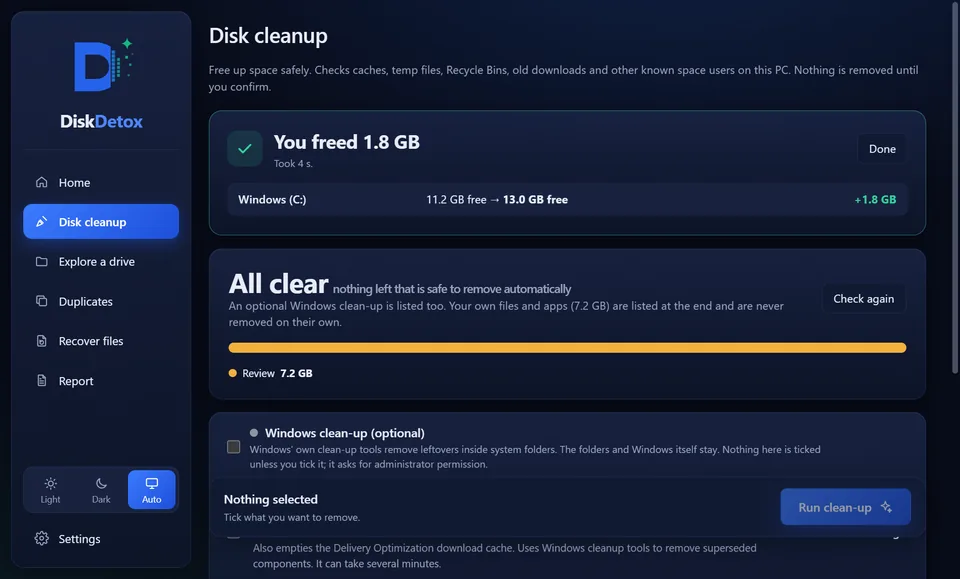
Windows clean-up and app cachesIn one pass, with a measured result.
Frequently asked questions
Is Disk Cleanup being removed from Windows?
Microsoft now recommends Storage Sense, but cleanmgr is still included in Windows 11 and works.
Why does cleanmgr hang on “Windows Update Cleanup”?
That step can take many minutes, especially on older PCs. Don't cancel it, and keep the PC switched on.
Why is there barely more space after cleaning?
Because the biggest space hogs often don't show up in cleanmgr: app caches, large videos, games or duplicate files. Find large files shows where the space is.