
Disclosure: DiskDetox is our own product (made by Aarvion). We receive no money for mentioning other programs; what we say about them is based on their makers' websites.
The well-known disk space analyzers
WizTree
WizTree reads the Master File Table directly on NTFS drives, which makes it very fast: even large drives are often scanned in seconds. It shows a tree view and a treemap. WizTree is free for personal use; business use needs a licence. Its strength is speed.
TreeSize
TreeSize comes from the German developer JAM Software. The free TreeSize Free shows folder sizes clearly as a tree, right from the File Explorer context menu. The paid edition adds analysis and reporting aimed mainly at businesses and administrators. Its strengths are the clear tree view and the edition for companies.
WinDirStat
WinDirStat is open source and has been around for many years. It's known for its colourful treemap, where every file is a rectangle coloured by file type. It's open source and easy to read at a glance.
SpaceSniffer
SpaceSniffer is a free, portable tool with an animated treemap you can zoom into. It runs without installation.
What DiskDetox adds
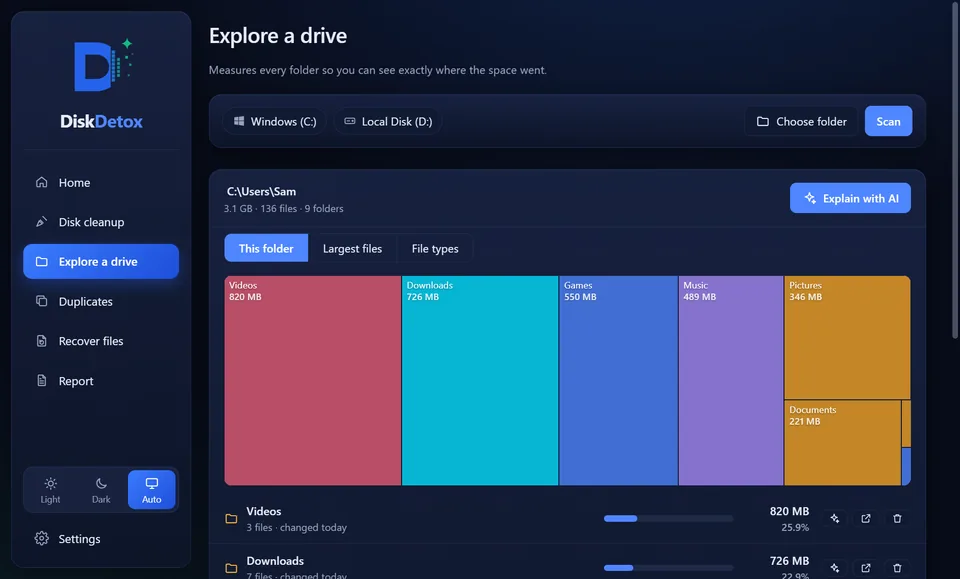
All four show well what uses the space. DiskDetox also explains what a folder is, suggests safe clean-ups and finds duplicates. See it in find large files, find duplicate files and recover deleted files.
| DiskDetox | |
|---|---|
| Disk space analysis | folder map (treemap), largest files, space by file type |
| Explains what a folder is | yes, optionally by AI with a risk rating |
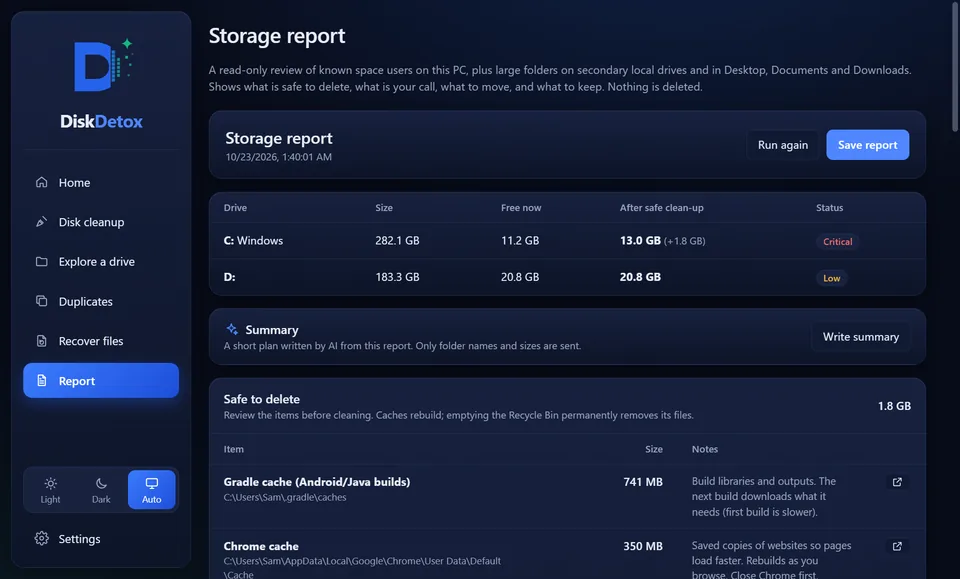
| Safe clean-up | caches, temporary files, old app versions, only after you confirm |
| Windows clean-up | Windows.old, component store, hibernation (optional) |
| Duplicate files | byte for byte, one copy kept |
| Recover deleted files | PC drives, USB sticks, memory cards, Android |
| Storage report | safe to delete, your call, move, keep |
| Price | free on the Microsoft Store, no ads |
Which tool fits?
- To see in seconds what fills a drive, WizTree does the job well.
- For servers and network drives at work, the paid edition of TreeSize is built for it.
- If you prefer open source, use WinDirStat.
- To understand what fills a drive, free space and recover deleted files in one app, use DiskDetox.
Get DiskDetox for freeDisk space analysis, clean-up, duplicate finder and file recovery in one app.
Frequently asked questions
Is DiskDetox faster than WizTree?
No, WizTree is hard to beat at raw scanning. DiskDetox focuses on what happens after the scan: understanding it, cleaning up safely and measuring the result.
Can DiskDetox delete files like TreeSize?
You can open any file or folder from the analysis in File Explorer or move it to the Recycle Bin. It's deleted for good only when you empty the Recycle Bin.
Does DiskDetox work with external drives?
Yes. You can scan any drive and any folder, including external hard drives and USB sticks.