
Where do duplicate files come from?
Phone photos reach the PC by cable, through OneDrive and through WhatsApp Web. Downloads collect files like Invoice (1).pdf and Invoice (2).pdf. Add folders copied by hand as a backup, and music or videos kept in several libraries.
Can Windows find duplicate files?
Not really. In File Explorer you can sort by name and spot files like Photo (1).jpg, but that won't find renamed copies or identical photos in different folders. And the same name doesn't mean the same content.
Only a content comparison is reliable: two files are duplicates exactly when they match byte for byte.
Find duplicate files with DiskDetox
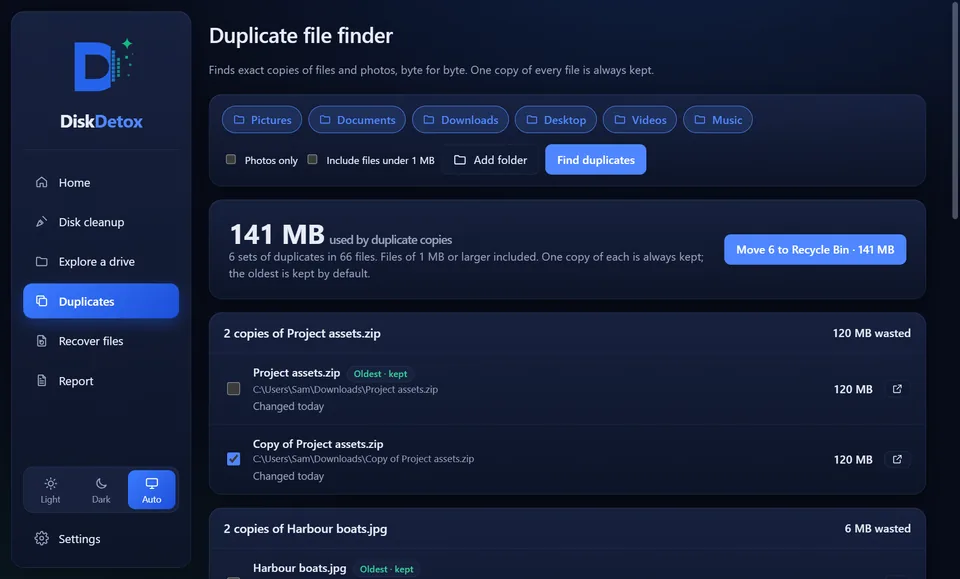
- Open DiskDetox and choose Duplicates on the left.
- Pick folders: Pictures, Documents, Downloads, Desktop, Videos, Music or your own folders.
- Start the scan. DiskDetox compares sizes first, then the start of each file, and finally the full content.
- Results appear in groups of identical files. In each group one copy is locked as the original, by default the oldest.
- Tick the extra copies and remove them. They go to the Recycle Bin, so you can still change your mind; recover files from the Recycle Bin shows how to get them back.
DiskDetox skips code projects, because identical files there are often intentional and removing them would break the project.
Remove duplicates safelyCompared byte for byte; extra copies go to the Recycle Bin.
Finding duplicate photos
For photos, DiskDetox finds exact copies: the same file, even under a different name or in another folder. Similar photos (burst shots or a resized version, for example) are not exact duplicates and are deliberately not reported as such. That way no picture that differs from the original ends up in the Recycle Bin.
Tips for a tidy photo library
- Bring photos to the PC one way only, for example only through OneDrive or only by cable.
- Remove duplicates before a new backup, or they travel along.
- Installers you no longer need don't belong in your collection. Find large files helps.
- More ways to make room are in free up disk space.
Frequently asked questions
Which file is kept?
One file in every group is always kept, by default the oldest copy, which is usually the original. Only what you tick is removed.
Does DiskDetox find duplicates on external drives?
Yes, you can add any folder, including on drive D or an external hard drive.