Disclosure: DiskDetox is our own product (made by Aarvion). We receive no money for mentioning other programs; what we say about them is based on their makers' websites.
Why people look for a CCleaner alternative
CCleaner is now part of Gen Digital (Norton, Avast, AVG). Next to the free version there is a paid Pro version with extra features. Reasons to switch can include:
- prompts for paid features in the free version
- registry cleaning: Microsoft does not support registry cleaners (support article KB2563254 “Microsoft support policy for the use of registry cleaning utilities”), because changes to the registry can cause problems
- wanting to see what an item is before it's deleted
- a disk space analyzer, duplicate finder or file recovery, which otherwise means more programs
The alternatives at a glance
1. Windows' built-in tools: Storage Sense and Disk Cleanup
Windows has a solid basic clean-up built in: Settings → System → Storage. Storage Sense removes temporary files automatically, and Disk Cleanup clears update leftovers and Windows.old. Free and nothing to install, but no app caches for Teams, Spotify or Discord, and no explanations.
2. BleachBit
BleachBit is an open-source cleaner for Windows and Linux. It removes caches and histories of many programs and can securely overwrite files. The interface is technical and individual items come with little explanation. Good for people who know exactly what they're ticking.
3. DiskDetox
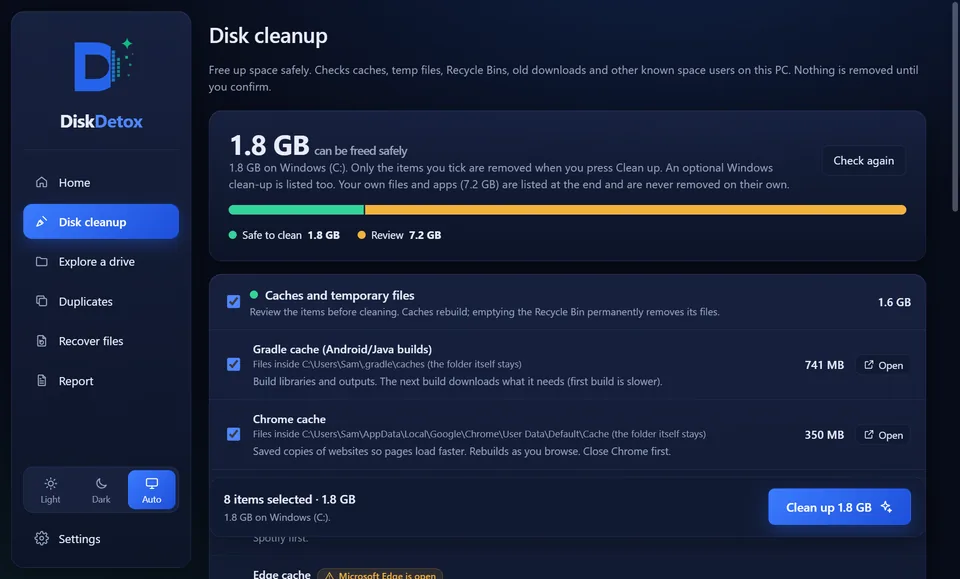
DiskDetox lists every item with its size, location and a short explanation; it removes what you tick and confirm.
What DiskDetox does differently
| DiskDetox | |
|---|---|
| Price | free on the Microsoft Store |
| Ads, upsells, account | none |
| Registry cleaner | no, on purpose |
| Explanation for every item | yes, optionally by AI with a risk rating |
| Running apps | detected; files in use are skipped |
| Result | space gained, measured on the drive |
| App caches | Teams, Discord, Spotify, Slack, VS Code, Chrome, Edge |
| Developer caches | npm, pnpm, Yarn, pip, Gradle, Maven, NuGet |
| Disk space analyzer | folder map, largest files, file types |
| Duplicate files | byte for byte, one copy always kept |
| Recover deleted files | PC drives, USB sticks, memory cards, Android |
| Platform | Windows 11 and 10, including Arm |
If you've been using CCleaner to clean up and Recuva to recover files, DiskDetox does both in one app. More: recover deleted files.
DiskDetox as a CCleaner alternativeFree on the Microsoft Store, no ads, no account.
What DiskDetox doesn't do
DiskDetox doesn't update drivers and doesn't change startup or registry entries. Cleaning up only makes a PC faster if drive C was almost full before.
Frequently asked questions
Do I need a PC cleaner at all?
For a basic clean-up, Windows' built-in tools are often enough. A tool like DiskDetox is worth it when drive C is full and you want to know what's using the space, when app caches have grown, or when you want duplicates and deleted files handled in the same app.
Can I use CCleaner and DiskDetox side by side?
Yes, they don't interfere with each other. Just don't let both clean at the same time.