
Check the built-in trash folders first
Gallery apps and cloud services keep deleted photos for a while:
- Android galleries usually have a Trash, Recycle bin or Recently deleted album. How long photos stay there is up to the phone maker.
- In Google Photos, deleted backed-up photos sit under Collections → Trash (Library → Trash in older versions) for up to 60 days.
- Photos deleted normally on a PC stay in the Recycle Bin until it's emptied. If it was emptied, see recover files from an emptied Recycle Bin.
- Pictures synced with OneDrive go to the OneDrive recycle bin on the web.
If they're not there, use one of the following.
Case 1: photos deleted on a PC
For photos that were on the PC's drive, the DiskDetox quick scan often still finds them with name and folder, for example Pictures\Holiday 2026\IMG_4521.jpg.
- Open DiskDetox and choose Recover files.
- Pick the drive, or the exact folder the photos were in.
- After the scan, click the Photos filter.
- Check them in the preview and save them to a different drive.
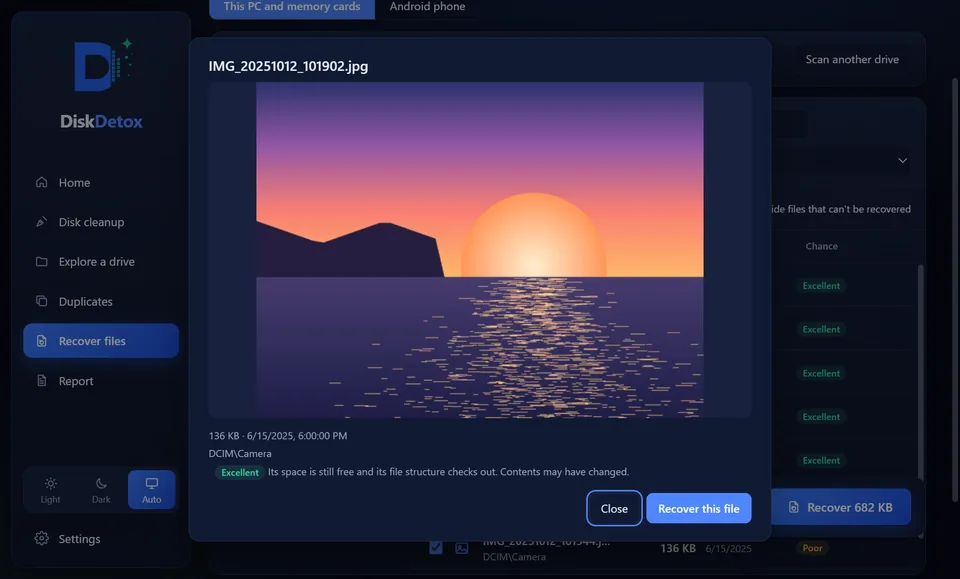
On an internal SSD the odds are lower, because SSDs wipe deleted areas quickly with TRIM. See recover deleted files for the background.
Case 2: photos deleted from a camera memory card
Memory cards from cameras, drones and action cams are usually FAT32 or exFAT and have no TRIM. Deleted pictures can often be recovered well, even after a quick format.
- Stop using the card and don't take new photos.
- Connect it to the PC with a card reader.
- In DiskDetox, choose the card under Recover files and run the quick scan first.
- If pictures are missing, run a Deep scan. It finds JPG, PNG, HEIC, MP4 and MOV files by their content.
More: SD card and USB stick recovery.
Get your photos backWith a preview and a recovery chance for every picture before you save.
Case 3: photos deleted on an Android phone
DiskDetox can connect to Android phones over USB and look for pictures that disappeared from the gallery:
- Recently deleted and gallery trash folders from different makers
- Thumbnails, which often still exist when the original is gone
- WhatsApp and Telegram media
Photos that still exist on the phone are hidden, so you only see what is missing.
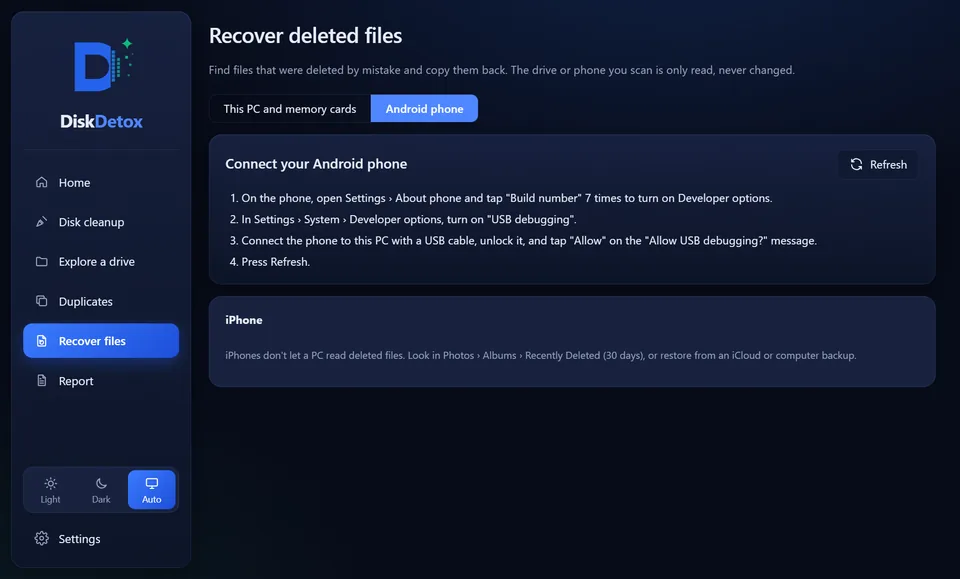
How to do it:
- Turn on Developer options on the phone: Settings → About phone, then tap Build number seven times (the wording varies by maker).
- In Developer options, turn on USB debugging.
- Connect the phone with a USB cable and allow access on the phone.
- In DiskDetox, choose Recover files → Android phone.
- Check the pictures in the preview and copy them to your PC.
On rooted phones DiskDetox can also run a deeper scan of internal storage. Turn USB debugging off again when you're done.
iPhone: Apple does not allow a PC to read deleted files from an iPhone. Check the Recently Deleted album there (up to 30 days) and your iCloud Photos.
Recover WhatsApp images
On Android, WhatsApp keeps received pictures and videos in its own media folder. If they were deleted from the gallery, DiskDetox often still finds them there or as a thumbnail. DiskDetox cannot recover deleted chats or messages; only WhatsApp's own chat backup can do that.
Frequently asked questions
Can I recover photos I deleted months ago?
From a memory card or USB stick that has barely been used since, often yes. On a PC's everyday drive C or a phone's internal storage they have usually been overwritten long ago.
Are photos recovered in full quality?
When the recovery chance is good, yes, as the original file. A thumbnail is only a small, low-resolution copy, but often better than no photo at all.
Do I need root for Android recovery?
No. Without root DiskDetox searches trash folders, thumbnails and messenger media. Root adds a deeper scan of internal storage.